
Symptoms
Some users on Intel-based MacBooks with Chrome 142+ may experience blurry screens, glitching, or black screens during exam startup or submission. This is caused by Chrome's transition from OpenGL to Metal rendering, not by recent application updates.
Cause
Chrome recently transitioned from OpenGL to Metal rendering. Metal is poorly supported on GPUs in older Intel-based MacBooks. Chrome has no announced plans to fix this compatibility issue.
Workarounds
If you experience this issue, please try one of the following workarounds:
- Disable Hardware Acceleration
Try disabling hardware acceleration in the browser — this may allow you to complete the session successfully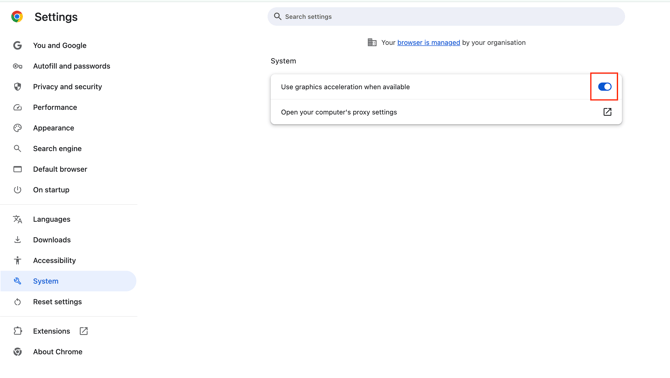
- Change ANGLE Graphics Backend
- Open the page chrome://flags
- Find the option "Choose ANGLE graphics backend", and switch it to another value (OpenGL will likely work better)
- Save and restart the browser - Force OpenGL via Command Line
If the needed option is not available in chrome://flags, launch Chrome from the terminal with the flag--use-angle=openglto force OpenGL:
/Applications/Google\ Chrome.app/Contents/MacOS/Google\ Chrome --use-angle=opengl
Technical Details
All impacted users so far reported the following:
- Same browser (Chrome 142.x on macOS)
- Issues occur at critical transition points - upon entering exam and exam submission.
If the issue persists after trying these workarounds, please contact technical support with your browser version and system details.